
When a new ride request comes in, the system uses a smart queue with a “green and yellow card” mechanism to assign jobs fairly and efficiently.
How it works
Each driver has 10 seconds to accept a job.
ASAP orders: 10-second ringtone + long vibration.
Pre-booked orders: 2-second notification.
If the driver doesn’t respond, the system moves to the next one, applying the yellow and green card logic.
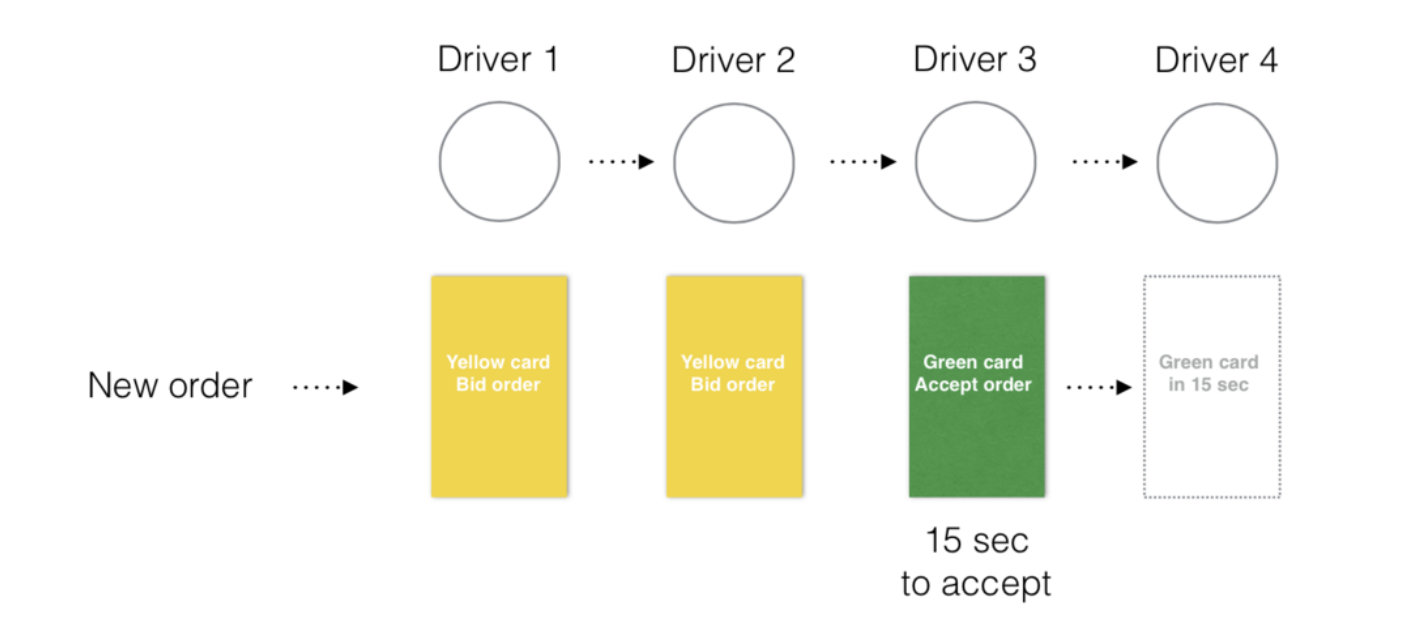
Green & yellow cards algorithm (example with 4 drivers)
Step 1:
The job is sent to Driver 1 (the driver who’s been idle the longest).
Driver 1 gets the green card and 10 seconds to accept.
Step 2:
If Driver 1 doesn’t accept, they get a yellow card.The order is now sent to Driver 2 (green card).Driver 1 can still bid for the job, but is no longer in priority.
Step 3:
If Driver 2 also doesn’t accept, they get a yellow card.
The system passes the job to Driver 3 (green card).Now Driver 1 and 2 can bid, but Driver 3 has priority.
What if multiple drivers bid for the order?
If two or more yellow card drivers bid and the green card driver doesn’t accept:
The system checks the Estimated Time of Arrival (ETA) from the bids.
The order goes to the driver with the shortest ETA.
⚠ Once a job is accepted, other bids are ignored.
👆Important note for drivers:
If a driver enters a false ETA (e.g. says 1 minute but takes 4), the customer may cancel.
The system may mark the case as “driver did not appear” and apply a cancellation fee if configured by the company.